 The Food Safety App
Guide for Environmental Health Officers
A brief reference for officers reviewing records exported from The Food Safety App, and for food businesses to print or email ahead of an inspection: sample pages, which official forms are used, what is inside a pack, and how to reach us.
What the exported pages look like
4 pages from the 71-page sample caterer pack (Example Café), exported directly by the app. Select any page to view the full image.
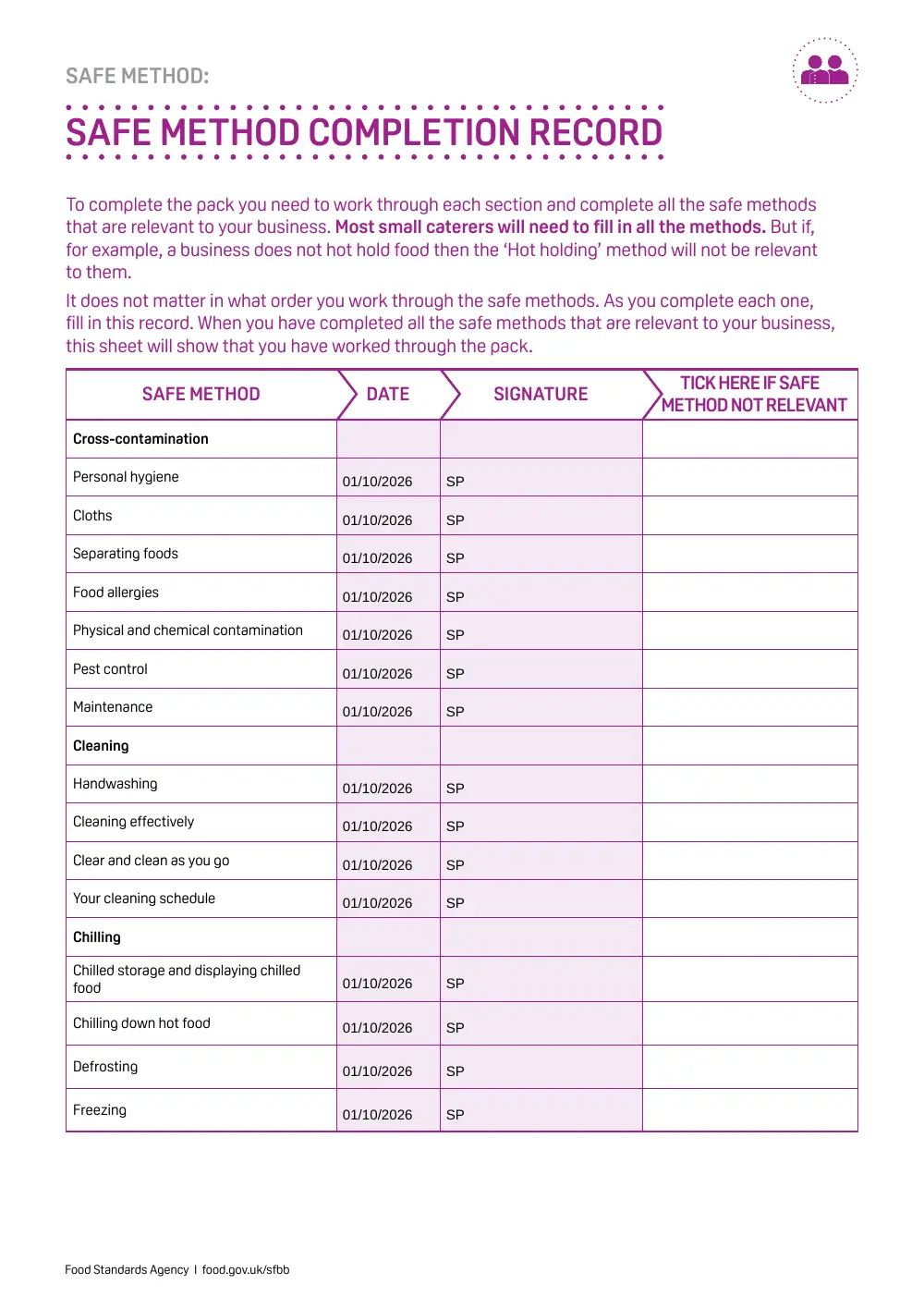
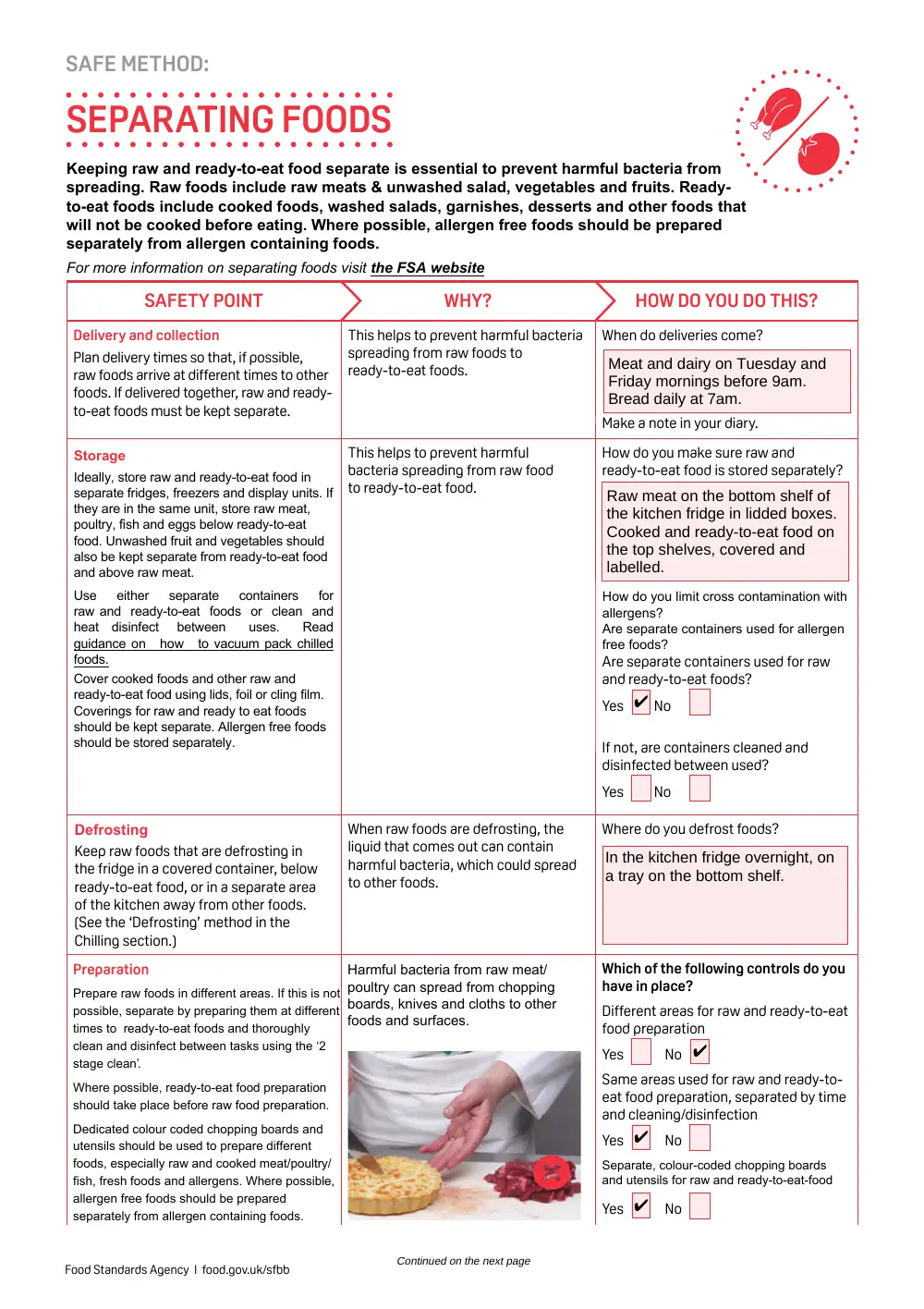
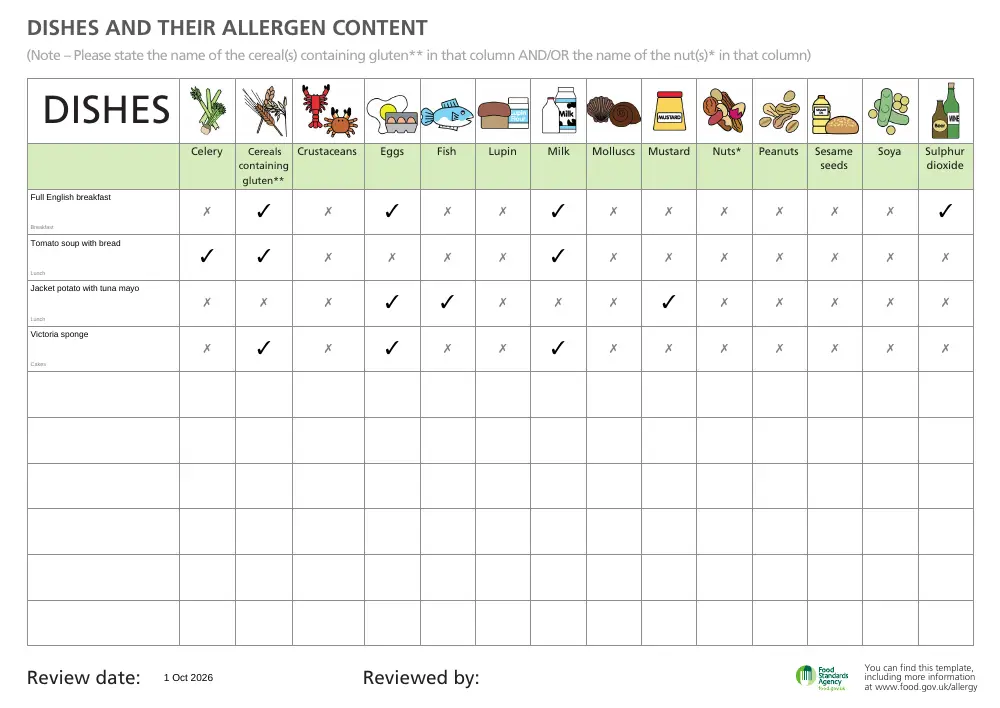
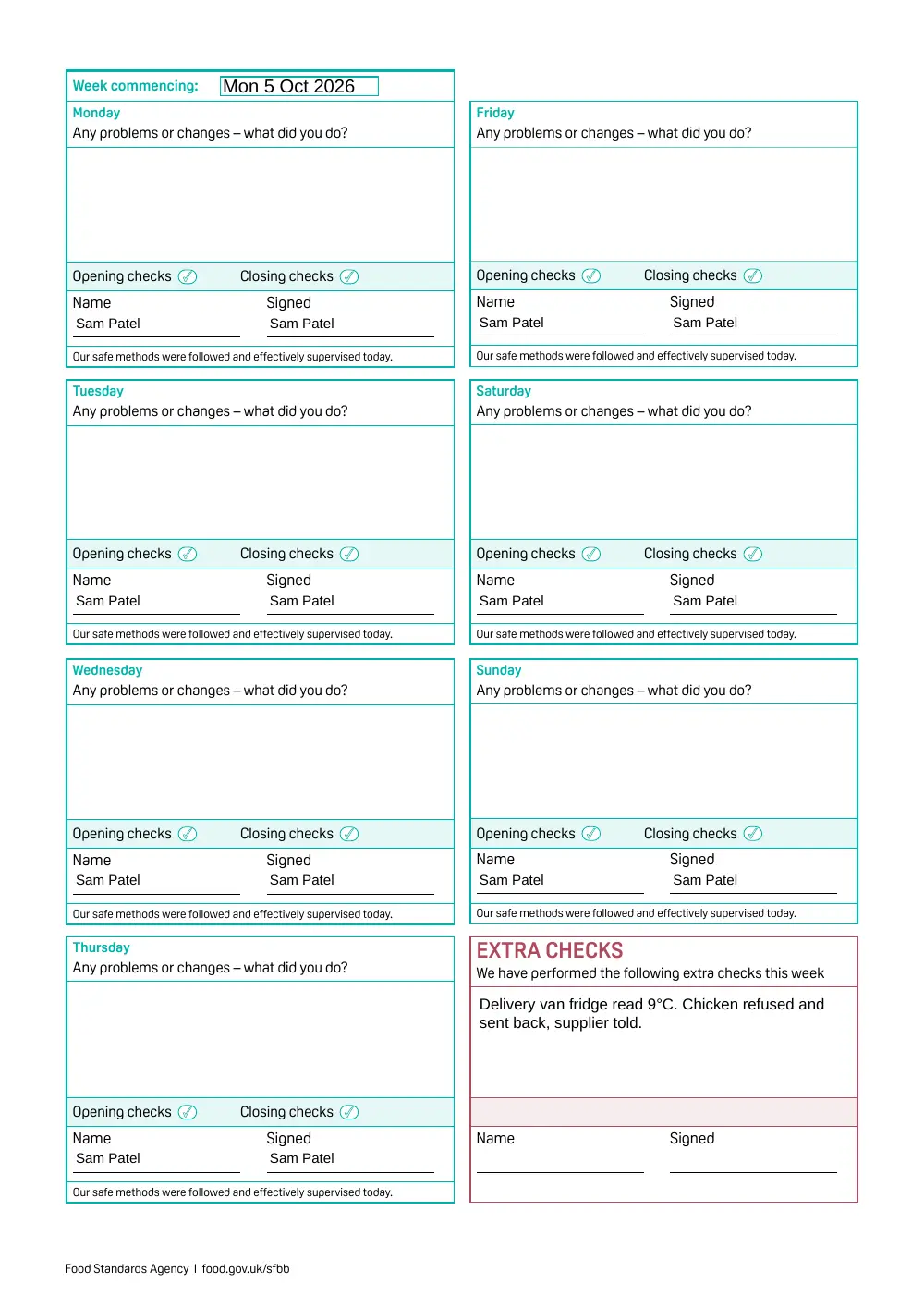
A food business can hand over its pack as a printed folder, email a PDF for any date range, or show the same records on a phone or tablet. See pages from a sample of each pack, made by the app for a made-up business.
Official forms, filled in directly
Where the Food Standards Agency or Food Standards Scotland publishes a form, the app writes the business’s records onto that official PDF template rather than inventing a proprietary layout. The app’s own headings, dates and form wording on exported PDFs are always produced in English even when kitchen staff use the app in another language; free text that staff type prints as they typed it.
The app supplies each of these official packs:
- Restaurants, cafes, takeaways, pubs and other caterers: the SFBB pack for caterers, 31 sheets, in England and Wales. See a sample pack
- Residential care homes (not nursing homes): the SFBB pack for caterers with the residential care home supplement, 34 sheets, in England and Wales. See a sample pack
- Restaurants and takeaways serving Indian, Pakistani, Bangladeshi or Sri Lankan food: the SFBB pack for Indian cuisine, 32 sheets, in England, Wales and Northern Ireland. See a sample pack
- Restaurants and takeaways serving Chinese food: the SFBB pack for Chinese cuisine, 33 sheets, in England, Wales and Northern Ireland. See a sample pack
- Shops and other food retailers: the SFBB pack for retailers, 25 sheets, in England, Wales and Northern Ireland. See a sample pack
- Registered childminders who provide food for the children they look after: the SFBB pack for childminders, 8 sheets, in England, Wales and Northern Ireland. See a sample pack
- Catering businesses in Scotland, including Indian, Chinese and care home kitchens: CookSafe, from Food Standards Scotland, 11 sheets, in Scotland. Its sheets show in English whatever language the phone is set to. See a sample pack
Bundled blank templates are compared weekly against the agencies’ published copies using SHA-256 checksums. Where a template is adapted from a multi-page publication (such as diary pages or CookSafe record sheets) or uses an older published template (the FSA allergen chart), the exception is recorded publicly: view the dated template provenance inventory, or browse the blank official sheets we hold.
We are not the Food Standards Agency or Food Standards Scotland, and we are not affiliated with either.
What an EHO pack contains, in order
When a business exports an EHO inspection pack for a chosen date range, the PDF combines the core records in this order. Sections without a fixed calendar grid (incidents, deliveries, custom checklists and prove-it checks) appear only when something was recorded in the period. By contrast, fixed-period records print across the whole range so gaps stay visible: SFBB diary pages cover every week in the range (with four-weekly review pages), SC2 prints every calendar month touched by the range (except in childminder packs), CookSafe prints its Weekly Record, Review, Hot Temperature and Hot Holding pages even when blank, and childminder packs always include the action sheet and 3-monthly reviews.
- Cover page. Prints “EHO PACK”, the business name, the exact Monday-to-Sunday diary date range printed on the diary pages, and the pack scope (naming which pack is supplied). If a business is self-declared rather than linked to a Food Hygiene Rating Scheme listing, the cover prints a “No FSA listing” badge.
- Safe Method Completion Record and safe method sheets. Pre-prints every method with completion dates and initials, plus an “X” in the not-relevant column for methods marked not relevant; incomplete methods stay blank. (Where a business uses a custom selection of methods rather than one standard pack inventory, a plain list prints each method’s status: Outstanding, Requires review, Awaiting sign-off, Not relevant, or completion date and initials.) Completed safe method sheets follow (or all sheets if the business chose to include unfinished ones), with methods marked not relevant omitted as individual sheets. CookSafe packs print the CookSafe Action Plan here and follow the signed flow diagram with its matching HACCP charts; childminder packs sign each safe method on its own lines instead of using a separate completion record.
- Allergen chart and staff training record. Included when dishes or staff are listed. The allergen chart prints ticks for contains, grey crosses for does not contain, “MC” for may contain, blank cells where unanswered, and a review date set to the most recent dish edit. The staff training record lists every canonical safe method for each staff member, filling dates and initials where trained and leaving untrained rows blank.
- Incidents, probe calibration, deliveries and custom checklists. Where SFBB publishes no official form of its own, the app prints plain A4 pages in the same bundle: dated incident logs (with initials, related safe method, action taken and any attached photo), probe calibration tables (included whenever any probe is registered, naming unchecked probes if no checks exist, and showing checks across dates rather than cutting them to the cover’s diary window so calibration evidence for the four-weekly review is visible), dated and timed delivery tables, and owner-created checklists with dated sign-offs and recorded answers. CookSafe packs use CookSafe’s Monthly Probe Thermometer Check (one page per probe), and childminder packs always print the FSA action sheet and 3-monthly reviews.
- Temperature records and prove-it checks. Prints one official FSA Safe Catering SC2 fridge and freezer sheet for every calendar month touched by the diary range when temperature records are included, followed by Prove it: Records sheets where recorded in the period. CookSafe packs print CookSafe’s Cold Food Record (per month), Hot Temperature Record and Hot Holding Record when temperature records are included, and childminder packs omit SC2 months that have no fridge readings.
- Diary pages and reviews. Full Monday-to-Sunday official FSA diary week pages covering the chosen range, with opening and closing check ticks, problem and action notes, and the names of everyone who signed checks that day, followed by official four-weekly review pages. CookSafe packs print CookSafe’s Weekly Record (one page per week in the period) and Review pages before the diary; childminder packs print the diary for the period only if at least one non-closed entry was recorded in it (otherwise no diary pages are included) and use 3-monthly reviews.
Records exported separately: cleaning schedules, supplier lists, contact lists, SC3 cooking, cooling and reheating sheets and SC4 hot-holding sheets export as their own PDFs rather than inside the combined EHO pack. SFBB records can also be exported individually on their own (CookSafe’s own record pages are exported as part of the combined pack).
Notes for reading an exported pack
A few conventions built into the PDF creators make the exported sheets quicker to check during an inspection:
Uniform A4 portrait printing
Every page in a combined EHO pack is flattened onto standard A4 portrait sheets so it prints and staples cleanly. Wide pages, such as the A3 landscape allergen chart, are rotated 90 degrees to fill the sheet legibly.
Closed days vs blank days
There are two kinds of closed day on the diary pages: a day the business marked closed prints its closure reason (or “Closed” if none was typed), while any regular closed day from the business’s usual opening hours is filled in automatically as “Closed - usual closing hours”. An open day with nothing recorded stays blank.
Fridges marked not in use
On SC2 sheets, a diagonal slash in a cell marks a unit as not in use (off and empty) and is explained in the comments column on the same row (naming who marked it and at what time where recorded).
Long notes and continuation sheets
Long answers on safe method sheets expand their box cleanly or continue on a continuation sheet rather than clipping text. Diary notes or daily signer lists that outgrow their form boxes continue on a titled continuation sheet.
Gaps are left visible
Untrained rows on the staff training record and unfinished rows on standard completion records stay blank (custom method lists print explicit status labels such as Outstanding). A registered probe with no calibration checks still prints a probe section naming the unchecked probes.
Manual temperature readings
Temperature entries are readings entered by kitchen staff rather than automated fridge telemetry. The app does not verify that a physical check took place.
Who builds the app, Primary Authority and officer contact
The Food Safety App is built and operated by Small Dog Big Dreams Ltd (Companies House number 15055364, registered in England and Wales; ICO registration ZB787690). Business records are private to each business and stored in Google’s European data centres. Close your account and we delete your records from our systems. They drop out of our backups within 14 weeks. We never delete a business’s records because nobody has signed in for a while. Full infrastructure, backup and sub-processor details are published on our security and data page.
We are proud to work with Buckinghamshire and Surrey Trading Standards as our Primary Authority. Each business’s own local authority still has the final say on its food safety management system, and using the app does not certify compliance or imply endorsement by any council, the Food Standards Agency or Food Standards Scotland.
If you are an Environmental Health Officer and have a question about a template, a pack layout, or any record a business has shown you, email us at support@fsyay.co.uk.
Questions officers ask
Can a business provide printed or emailed PDFs instead of handing over a phone?
Yes. Any date range exports as a standard A4 portrait PDF that the business can print, email or save. There is no paid export tier or lock-in preventing a business from producing its records.
Do the exported sheets match the current official published forms?
For official templates, the app writes directly onto the published PDF forms and compares its bundled blank templates weekly against the agencies’ copies. Known exceptions (such as extracted diary pages and the older FSA allergen chart) are listed on our dated template provenance inventory.
Does the Primary Authority partnership mean the app is approved?
No. We are proud to work with Buckinghamshire and Surrey Trading Standards as our Primary Authority, and each business’s own local authority still has the final say on its food safety management system.
What if kitchen staff use the app in another language?
Staff can use the app interface and guidance sheets in other languages. On exported PDFs, the app’s own headings, dates and form wording are always produced in English for inspection, while free text that staff type prints as they typed it.
Are cleaning schedules and supplier lists included in the combined EHO pack?
No. Cleaning schedules, supplier lists, contact lists, SC3 cooking, cooling and reheating sheets and SC4 hot-holding sheets export as their own separate PDFs so a business can supply them alongside the combined EHO pack. SFBB records can also be exported individually on their own, while CookSafe’s own record pages are exported as part of the combined pack.